
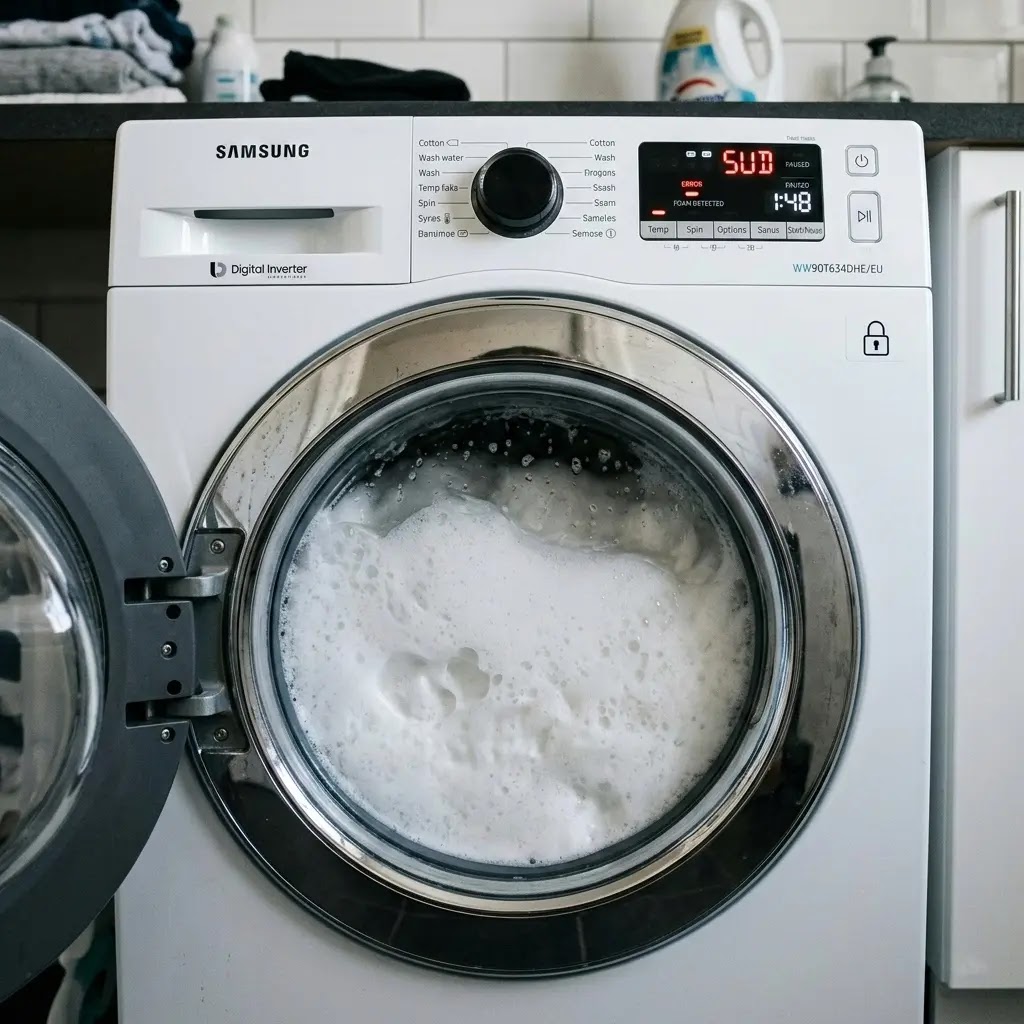
Fixing the Samsung Washer Sud Error
Table of Contents
I. Introduction: The Foam Explosion (A Personal Story)
We’ve all been there. You load up your Samsung washer, press Start, and head off to enjoy your morning coffee. You return fifteen minutes later expecting progress, but instead, you find the machine sitting in an eerie silence. The display isn’t counting down; instead, it’s flashing SUD or Sd. When you look through the glass door, your clothes have disappeared behind a wall of thick, white foam that looks more like a bubble bath gone wrong than a laundry cycle.
I remember the first time this happened to me. My immediate reaction was pure panic. I was convinced the pump had failed or that I had somehow broken the internal seals of a very expensive appliance. I was already mentally calculating the cost of a service call. However, I soon learned that the Sud error is actually a brilliant piece of engineering. Your washer isn’t broken; it is actively protecting itself from damage. It has detected an environment that could burn out the motor and has safely paused the operation. In this guide, I’m going to walk you through exactly how I mastered this situation, using simple steps that anyone can do at home.

II. The Science of SUD: Why Does it Happen?
To fix the error effectively, we need to understand the logic of the machine. Modern Samsung washing machines use highly sensitive pressure sensors to monitor water levels. Foam (suds) is a strange substance; it is mostly air but takes up a massive amount of space. When the pressure sensor detects a clog of air and foam that doesn’t behave like liquid water, it sends a red flag to the control board.
If the machine were to attempt a high-speed spin cycle with this amount of foam, the resistance against the drum would be immense. This resistance forces the motor to work ten times harder, leading to overheating. Samsung’s software is designed to trigger the Sud code, stop the agitation, and enter a suds reduction period. This allows the bubbles to naturally collapse back into liquid. In the newest AI-powered models, the machine may even attempt to add extra water to dilute the soap, but if that fails, the error code becomes permanent until you intervene.
2.0 AI Turbidity Sensing: In 2026, Samsung has moved beyond simple pressure switches. The latest AI-powered washers use optical turbidity sensors. These sensors see through the water to measure detergent concentration. If the SUD code appears, the AI doesn’t just pause; it automatically recalculates the cycle to add up to three additional micro-rinses to neutralize the foam before you even see the error on the screen.
⚠️ ELECTRICAL SAFETY MANDATE
Before performing any physical inspection, opening the maintenance door, or clearing the drain system, you MUST unplug the washer from the wall outlet. Never attempt to service a machine while it is connected to power, as water spills during the cleaning process create a high risk of electric shock.
III. Immediate First Aid: What to Do Right Now?
The moment you see the error, stop. Do not repeatedly press the Start/Pause button. Forcing the machine to try and spin through thick foam is the fastest way to turn a simple software error into a hardware failure. The most effective first step is actually patience. Give the machine 30 minutes. During this time, the chemistry of the detergent will change, and the bubbles will settle.
After the foam has visibly decreased, you need to clear the chemical residue. Do not add more detergent! Switch the machine to a rinse & spin cycle. This uses a fresh burst of water to flush the excess soap out of the fibers of your clothes and out through the drainage system. If the Sud error reappears during this rinse, it means the soap is so concentrated that the drainage path itself is likely blocked by a foam plug.
IV. The Hidden Culprit: The Drain Pump Filter
If the error persists, the problem is likely physical. Soap doesn’t just disappear; it turns into a thick, slimy residue that can trap lint and hair in your drain pump filter. When this filter is clogged, the soapy water can’t exit the machine fast enough, so it just keeps getting whipped up into more foam by the spinning drum.
⚠️ SCALDING HAZARD WARNING
If you were running a sanitize or hot wash when the error occurred, the water inside the drum will be dangerously hot. Wait at least one hour for the water to cool before using the emergency drain tube to prevent severe skin burns.
Step-by-Step Filter Maintenance:
- Access the Pump: Open the small square door on the bottom front of your washer.
- The Emergency Drain: Pull out the small black rubber tube. Place a shallow bowl underneath and remove the plug. Let all the trapped water drain out completely.
- Remove the Filter: Turn the large circular knob (the filter) counter-clockwise. Be ready with a towel, as some residual water will spill.
- Clear the Debris: You will likely find a nest of lint, coins, or detergent gunk. Wash the filter under a hot tap until every hole is clear.
- Inspect the Housing: Reach your finger into the hole where the filter was and make sure nothing is wrapping around the small propeller (the impeller).
- Reassemble: Screw the filter back in clockwise (tightly!) and secure the emergency tube plug before closing the door.
V. Advanced Troubleshooting: Beyond the Bubbles
Sometimes you might see a Sud error when there is absolutely no foam visible. This is incredibly frustrating, but it usually points to a sensor glitch. The pressure switch is a small device that measures the weight of the air in a tube connected to the drum. If a tiny piece of debris or biofilm gets stuck in that thin tube, it creates a false pressure reading, tricking the computer into thinking the machine is full of suds.
If cleaning the filter didn’t work, try a soft reset. Modern washers have control boards that can store error states in their memory. Unplug the machine for 10 full minutes. This allows the capacitors on the board to fully discharge. When you plug it back in, the system will perform a POST (Power-On Self-Test) and often clear the ghost error, allowing you to resume your wash.
- The Ghost SUD Loop: In some 2026 Samsung AI models, the SUD error can get stuck in the machine’s active memory even after the foam is gone. If a soft reset doesn’t work, try this: start a self-clean cycle but cancel it after 2 minutes. This forces the drain pump to run a high-torque flush, which often clears the pressure sensor’s internal logic better than a standard reset.
- Auto-Dispense Calibration: If you are using a 2026 Bespoke model with Auto-Dispense 2.0, the SUD error is often caused by a settings mismatch. Check your SmartThings app to ensure the detergent concentration is set correctly (1x, 2x, or 3x). If you use a 3x concentrated soap but the machine thinks it’s 1x, it will pump triple the amount needed, triggering a permanent SUD state.

VI. The Hard Water Connection
This is a technical insight that many homeowners miss. Detergent performance is dictated by your water’s mineral content. If you have hard water, the minerals prevent soap from foaming easily, so you might be used to using a full cap of detergent. However, if you recently installed a water softener, your water is now soft.
Soft water makes detergent extremely active. In soft water environments, using the same amount of soap you used before will cause an instant suds error. If your water is soft, you should only be using about 1 to 2 tablespoons of detergent for a full load. Any more than that is simply a waste of money and a risk to your machine’s sensors.
- The Cold Wash Trap: Many people will use Cold Wash to save energy in 2026. However, many HE detergents do not dissolve fully in water below 60°F (15°C). This creates a thick, undissolved sludge at the bottom of the outer drum. If you see the SUD error frequently, try switching to a warm wash for one cycle; it helps the surfactants in the soap break down properly so they can be flushed out.
VII. Prevention: Never See SUD Again
Once you’ve cleared the error, you want to make sure it never returns. Here is the maintenance routine I use to keep my Samsung washer in peak condition:
- The HE Only Rule: Ensure your detergent has the HE (High Efficiency) logo. Regular detergent is designed for old-style washers that use 40 gallons of water. Your Samsung uses a fraction of that, and regular soap will overwhelm it.
- The Monthly SelfClean: Run the SelfClean or PureClean cycle once a month without clothes. This uses high-heat water to dissolve the biofilm (soap scum) that builds up on the outer drum.
- Vinegar Flush: Every 3 months, pour two cups of white distilled vinegar into the detergent drawer and run a hot cycle. Vinegar is a natural acid that breaks down the alkaline soap residues that cause Sud errors.
- Drum Clean+ vs. Chemicals: While vinegar is a traditional DIY fix, Samsung’s 2026 warranty guidelines prioritize the Drum Clean+ cycle. This specialized cycle uses a 70C high-temperature jet and 1400 RPM friction to blast away biofilm without acidic cleaners. Only use vinegar once every 6 months to avoid degrading the high-tech silicone seals used in newer Eco-Bubble generators.
Maintenance Tip: The Bubble Generator:
Samsung’s Ecobubble™ tech uses a small motor to mix air and soap. If you have used the wrong detergent for a long time, this generator can get crusted with old soap. Every 6 months, run a cycle with nothing but 1 liter of hot water and 100 g of citric acid. Unlike vinegar, citric acid is better at breaking down the specific calcium-soap bonds found in Samsung’s internal bubble valves.
VIII. Expert FAQs
Q: Why won’t my door unlock when the Sud error is on?
A: This is a safety lock. The machine believes there is a high-pressure environment inside. You must wait for the suds to settle or use the emergency drain tube at the bottom to empty the water before the lock will release.
Q: Can I use laundry pods in a Samsung washer?
A: Yes, but only one. Pods are extremely concentrated. If you use two pods for a medium load, you are almost guaranteed to trigger a Sud error because the detergent-to-water ratio becomes too high.
Q: Is it okay to use vinegar and baking soda together?
A: For cleaning the drum, it’s better to use them separately. Use vinegar for one cycle to remove soap scum and baking soda for another to remove odors. Mixing them just creates salt and water, neutralizing their cleaning power.
IX. Conclusion: Mastering Your Machine
The Samsung Sud error can be startling the first time you see it, but it’s important to remember that it’s a sign of a healthy, protective system. It isn’t a failure; it’s a warning. By understanding the balance between detergent, water quality, and regular maintenance, you can ensure that your laundry days remain stress-free.
I’ve found that taking the 15 minutes to clean the drain filter every few months not only stops the suds errors but also keeps the machine smelling fresh. You don’t need a technician to fix a suds problem; you just need a little bit of patience and the right DIY knowledge. Now that you know the secrets, you can get back to your laundry with total confidence!

Final Summary Checklist:
- Power down and unplug the machine for safety.
- Allow 30 minutes for the foam to settle naturally.
- Clean the bottom drain pump filter of all lint and debris.
- Run a Rinse & Spin cycle with NO detergent to flush the system.
- Switch to HE-certified detergent and use no more than 2 tablespoons per load.