
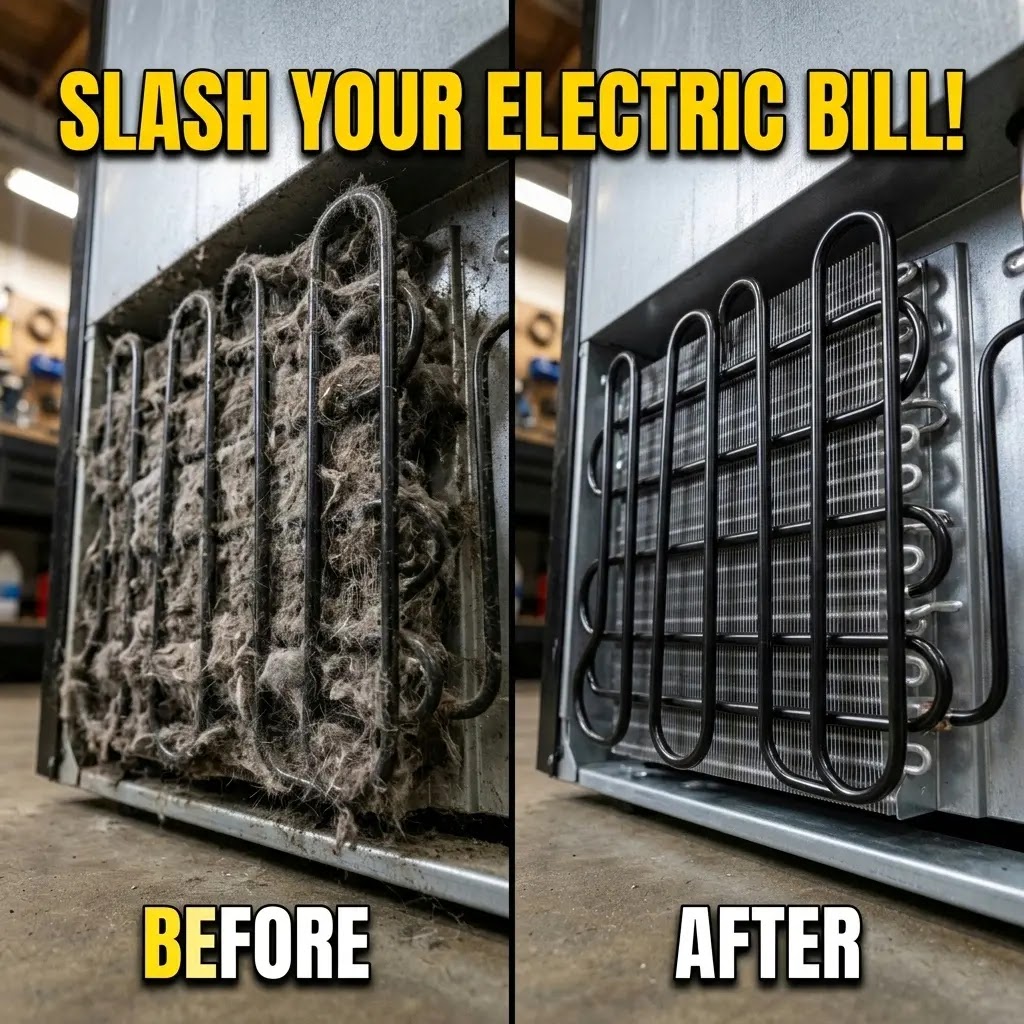
Maintenance Guide: How to Clean Samsung Refrigerator Condenser Coils
A Guide to Saving Money and Protecting Your Home

I. Introduction: My Personal Wake-Up Call
I still remember the night I realized I was neglecting my refrigerator. It was around 2:00 AM, and the kitchen was silent, except for a loud, strained humming coming from my Samsung fridge. It sounded like a car trying to drive uphill in the wrong gear. A few days later, I opened my electricity bill and felt a genuine pit in my stomach. The cost had jumped significantly, yet we hadn’t bought any new appliances or changed our habits.
Like most people, I was diligent about cleaning the shelves and throwing out expired milk, but I had completely ignored the engine of the machine. After a quick call to a technician friend, I learned about the condenser coils. These are the cooling tubes hidden out of sight that allow the fridge to breathe. When they get covered in dust, pet hair, and kitchen grease, your fridge begins a slow process of choking. It works harder, runs longer, and eventually, it breaks.
In this guide, I want to walk you through exactly how I fixed this problem myself. This isn’t just a technical manual; it’s a lesson in home ownership that I learned the hard way. Spending just 15 to 20 minutes twice a year on this task can add up to 5 years to your fridge’s life and keep your wallet much heavier. If you’re looking to save money and avoid a $1,000 repair bill, you are in the right place. I’ve simplified all the technical jargon so that you can feel confident doing this yourself.
II. The Radiator Secret: Why Your Fridge Needs to Breathe
To understand why a bit of dust is such a big deal, we need to clear up a common myth. Your refrigerator doesn’t actually create cold air. Instead, it works by removing heat from the inside and pushing it out into your kitchen.
Inside the fridge, a cooling liquid (refrigerant) absorbs the heat from your food. It then travels to the condenser coils, usually located at the back or bottom, where that heat is supposed to escape into the room. Think of these coils as the radiator of your fridge, just like the one in your car. They are the primary way the machine stays cool and healthy.
The Blanket Effect:
When dust, lint, and pet hair settle on these coils, they create a thick insulation blanket. This blanket traps the heat inside the tubes. Because the heat can’t escape, the fridge’s heart, the compressor, has to work overtime. It runs for hours without stopping just to keep your milk from spoiling. This constant straining is what causes that loud humming noise and the spike in your energy bill.
For Samsung owners, this is especially important. Modern Samsung units use Digital Inverter technology. This means the motor is designed to be smart and change its speed to save energy. However, when coils are clogged, the motor is forced to stay at its highest speed constantly. This creates massive stress on the internal electronics and can lead to a total system failure long before it should. A clean coil means the inverter can slow down, save you money, and run silently as intended.

III. The Money Talk: How Dust Steals Your Cash
I used to think that appliance maintenance was just something people with too much free time did. I was wrong. It’s actually one of the best ways to put money back in your pocket. Here is how the math breaks down based on current research:
-
1. Lowering Your Monthly Bills: Research shows that dirty coils can increase a refrigerator’s energy use by up to 35%. For an appliance that runs 24/7, this adds up fast. By cleaning them, most households save between $50 and $150 per year on electricity.
-
2. Avoiding the Repair Nightmare: The compressor is the most expensive part of your fridge. Replacing a failed Samsung compressor can cost between $700 and $1,250 when you include labor and parts. A $10 brush and 15 minutes of work can prevent this disaster entirely.
-
3. Protecting Your Groceries: When a fridge is struggling, the temperature inside isn’t stable. This causes micro-spoilage, where your food goes bad just a day or two earlier than it should. Over a year, the cost of thrown-away milk, meat, and veggies can be hundreds of dollars.
⚠ CRITICAL SAFETY WARNING: READ BEFORE STARTING ⚠
Your safety is the most important part of this job. Please follow these two rules strictly to avoid any accidents:
- ALWAYS Unplug the Unit: Never work on a refrigerator while it is connected to power. This eliminates the risk of electric shock and prevents the fan from turning on while your hands are near it.
- The 10-Minute Rule (The Hidden Battery): Samsung refrigerators use parts called capacitors that store electricity like a battery, even after the plug is pulled. They can still give you a sharp zap if touched too soon. After unplugging, wait at least 10 minutes before opening any panels. This allows the stored energy to safely drain away.

- NO WATER OR SPRAYS: Never use water, wet cloths, or cleaning sprays directly on the coils or wiring. This can cause rust, permanent damage to the electronics, or a dangerous short circuit when you plug it back in.
IV. The Essential Toolkit
You don’t need fancy tools. Most of these are already in your broom closet:
- Vacuum Cleaner: A model with a narrow hose or brush attachment is best.
- Coil Brush: A long, flexible brush that looks like a giant pipe cleaner. You can find them at any hardware store.
- Microfiber Cloth: To wipe down the fan blades and the outer casing.
- Flashlight: Essential for seeing the dust monsters in the dark corners.
- Screwdriver: Usually a Phillips-head, to remove the service panel at the back.
V. Step-by-Step Cleaning Guide
1. The Move
Gently pull the fridge about 2 feet from the wall. Be careful! If you have a water line for an ice maker, make sure you don’t pull it so far that it kinks or snaps.
2. Access
Locate the service panel at the bottom back. Use your screwdriver to remove the screws (usually about 7) and set the panel aside.
3. Vacuum
Use your vacuum’s narrow hose to suck up the loose dust bunnies from the surface of the coils and the floor. This stops the dust from flying around.
The Deep Clean Phase
Take your coil brush and slide it gently between the metal fins. Move it up and down to loosen the caked-on grime. Professional Tip: The fins are as thin as paper. Do not press hard or scrub across them. Bending them flat blocks the airflow and can hurt the fridge more than the dust did!
Finally, check the small condenser fan. If the blades are dusty, wipe them with your microfiber cloth. A dirty fan spins slower and makes the system run hotter. Once done, reattach the panel, plug the unit back in, and leave a 2-inch gap between the fridge and the wall for proper ventilation.

Note for 2026 “Clean Back” Models: If you own a newer Bespoke AI model and don’t see a black grill or a removable panel at the bottom back, your fridge uses Side-Wall Condensing. In these units, the coils are embedded inside the left and right side panels. For these, the cleaning isn’t about vacuuming coils, but about Clearance. Ensure there is at least a 2-inch gap between the fridge sides and your cabinets to allow the heat to dissipate.
The Back-Panel Screw Trick
Pro-Tip: Don’t Lose the Grounding Washer
When removing the back service panel, you will notice one screw has a small, serrated washer under it. This is the Electrical Grounding Screw. In 2026 models, if you don’t put this specific screw back in the correct hole, the SmartThings sensors might trigger a Grounding Fault error. Always mark that hole with a piece of tape!
2. The Condenser Fan Lubrication Myth
Technician’s Warning: No WD-40
While cleaning the fan blades, you might be tempted to spray oil on the motor. Do not do this. Samsung’s 2026 fans use Sealed Fluid Bearings. Adding external oil actually attracts more dust into the motor, turning it into a sticky paste that will burn the motor out in weeks. Just wipe the blades with a dry cloth.
VI. Advice for Hot & Dusty Climates (Pakistan/India)
If you live in regions like Pakistan or India (especially Faisalabad or Delhi), the air is often filled with fine dust, and summer heat can reach 48°C. In these areas, your fridge is already working at its maximum limit just to survive the environment. If you add dirty coils to that situation, it’s a death sentence for the compressor. I recommend checking your coils every 3 to 4 months during the hot season to ensure the unit doesn’t burn out.
VII. The 2026 SmartThings Fridge Whisperer
Samsung’s 2026 updates have introduced SmartThings Home Care, which acts like a mechanic living inside your fridge.
- AI Energy Monitoring: The app tracks your power usage in real-time. If it sees an unexplained spike over several days, it’s a tell-tale sign that your coils are likely blocked.
- C-Sensor Monitoring: In 2026, the SmartThings Home Care wizard monitors the C-Sensor (Condenser Temperature). If the coils reach over 55°C while the room is cool, the app will trigger a “Reduced Cooling Efficiency” alert. This is your digital cue that a physical cleaning is required before the compressor goes into “Thermal Protection” mode and shuts down.
- Home Care Notifications: Modern AI sensors monitor how long the motor runs. If it’s struggling to stay cool, the app sends an alert to your phone, reminding you to check for dust before a breakdown occurs.
- AI Fan Reverse Logic: The 2026 Samsung Digital Inverter motors now feature Auto-Dust Ejection. Periodically, the condenser fan spins in reverse for 60 seconds at high speed to blow loose dust away from the internal components. If you hear a sudden whooshing sound from the back of your fridge, don’t be alarmed, it’s the AI performing a mini-self-clean of its own airways.
VIII. Frequently Asked Questions (FAQs)
1. How do I know if my coils are dirty without moving the fridge?
Listen for the Always On symptom. If your fridge motor runs constantly without taking a break, or if the floor or sides of the fridge feel unusually hot to the touch, your coils are likely clogged.
2. I have cats and dogs. How often should I clean?
Pet hair is the number one enemy of refrigerator coils. It is sticky and creates thick mats that block air much faster than normal dust. If you have pets that shed, you should clean your coils every 3 months.
3. Will doing this myself void my Samsung warranty?
No. Samsung’s official manuals state that basic maintenance is the owner’s responsibility. Keeping the coils clean actually protects your warranty by preventing motor failure due to neglect, which is often not covered.
4. Can I use a hairdryer to blow the dust away?
Technically yes (on the cool setting), but it is very messy. It will send a massive cloud of gray dust all over your kitchen and clean dishes. A vacuum is much cleaner because it traps the dirt instead of just moving it.
Blower Warning: Avoid using high-pressure air blowers or canned air on 2026 models. These units have delicate Ambient Humidity Sensors located near the coil assembly. A blast of high-pressure air can dislodge these sensitive components or push dust deep into the main control board housing, causing a short circuit. Stick to a vacuum with a soft brush attachment for the safest results.